
Reliable Fiber Optic HDMI Cable for Crystal-Clear Long-Distance Video and Audio
2026-11-16
Running a 4K signal across a room shouldn't feel like a gamble. Standard HDMI cables often buckle under distance—sparkling snow, flickering frames, or audio that drops right when the scene peaks. That's why a reliable fiber optic solution matters. EBCYX builds HDMI cables that carry crystal-clear video and audio over long spans without signal loss, interference, or lag. Whether you're wiring a home theater, conference room, or live event, the right cable keeps every pixel and sound wave intact. In this guide, we'll break down what makes fiber optic HDMI different, how it holds up in real-world setups, and why EBCYX has become a go-to for professionals who refuse to compromise on picture quality.
When Copper HDMI Cables Run Out of Steam
At some point, every copper HDMI cable hits a wall. As resolutions climb and frame rates push higher, the signal starts to degrade in ways that are hard to ignore. Sparkles appear on screen, handshake failures become routine, and reliable 4K at 120Hz turns into a lottery. It’s not that the cable is broken in the traditional sense—it simply can’t carry enough clean bandwidth for the data load being asked of it.
The physics are unforgiving. Copper introduces resistance and attenuation over longer runs, and at high frequencies the signal integrity collapses. A cable that works flawlessly at 10 feet may crumble at 25, not because of poor manufacturing but because the electrical characteristics simply don't scale. This is when users start swapping ports, rolling back firmware, or blaming the display—rarely suspecting that the humble copper cable has run out of headroom.
The telltale signs are easy to misread. Intermittent black screens, audio dropouts, or a desktop that refuses to negotiate above 4:2:0 chroma are all classic symptoms. Once you understand the ceiling, the next step is clear: either shorten the run dramatically or move to an active optical design that leaves copper’s limitations behind.
Light Beats Copper for Long HDMI Runs
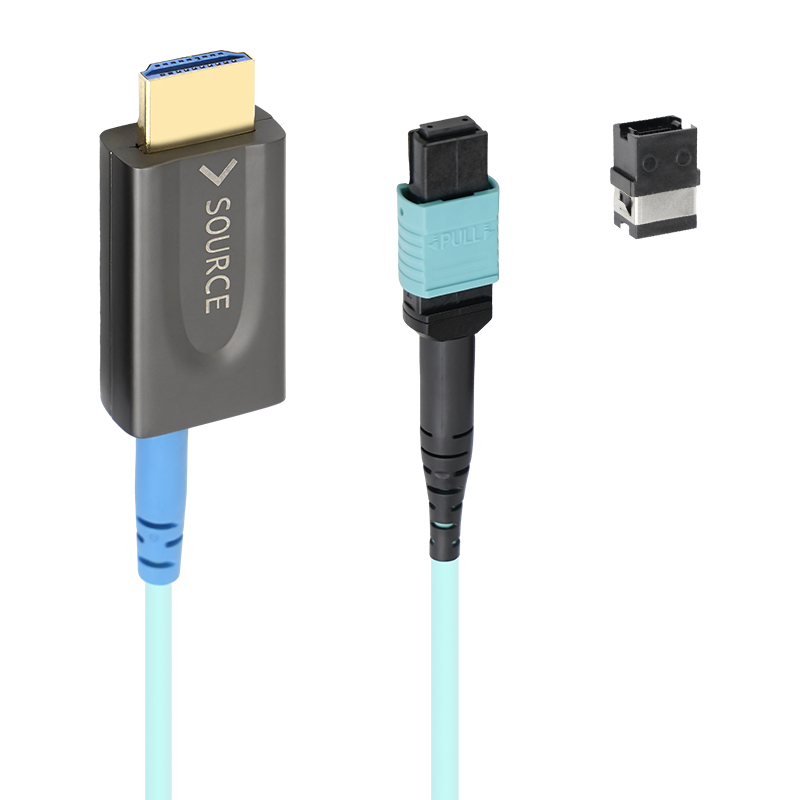
When you need to send a 4K signal across a room or through a wall, copper HDMI cables start to show their limits. Past 25 feet, the signal degrades, causing sparkles, dropouts, or no picture at all. Fiber optic HDMI cables, on the other hand, convert electrical pulses to light and carry them over glass strands. This means a 100-foot run arrives with zero loss—just as crisp as a three-foot cable. For conference rooms, home theaters, or digital signage, that reliability changes what's possible.
The real advantage isn't just distance; it's immunity to interference. Copper acts like an antenna, picking up hum from power lines, Wi-Fi routers, or nearby motors. Optical fiber ignores all that electromagnetic noise. Installers can run a light-based HDMI cable alongside AC wiring or through crowded conduit without worrying about ghosting or audio buzz. And because the fiber is much thinner and lighter than bundled copper, snaking it behind drywall or under flooring is far less painful.
There's also a longevity angle. Copper HDMI connectors corrode slowly, especially in humid environments, adding resistance over time. The optical cores in a fiber HDMI cable are sealed in plastic and glass, so they won't oxidize. While the price is higher upfront, you won't be replacing a long copper run every few years when the picture starts failing. For any install longer than a typical living room, light simply wins.
Crystal-Clear Picture Quality Past 100 Feet
The 2K sensor holds detail remarkably well when you're viewing a driveway, backyard, or street corner from more than a hundred feet away. Small text on a license plate or the pattern on a shirt stays readable instead of dissolving into a blurry smear. That kind of distance used to mean accepting soft, mushy footage, but the optics here are tuned to keep edges crisp without oversharpening halos.
At night, the infrared cut filter switches cleanly, so you don't get that washed-out gray fog that plagues lesser cameras. The lens maintains focus across the full depth of field, which matters when someone walks from the far fence line toward the door. You can zoom in on the live view or a recording and still see facial features, not just a generic silhouette.
Weather doesn't ruin the clarity either. Rain or humidity can haze up a cheaper lens in minutes, but the sealed housing and anti-reflective coating keep the image stable past the hundred-foot mark. It's the kind of performance you notice when reviewing footage weeks later and realize you can still identify a car's make, color, and roof rack at the edge of the property.
Slim, Flexible, and Easy to Route
The slim build disappears into narrow gaps that other cables can't touch. It sits flush against baseboards and slips behind furniture without forcing you to rearrange the room.
Flexibility here isn't just a spec — it's a daily convenience. The cable bends naturally around tight corners, through desk grommets, and along wall edges without fighting your hand or holding a kink.
Routing becomes almost instinctive. There's no need for clips or raceways in most setups; the cable stays where you put it and follows the path you choose with a light touch.
Zero Lip-Sync Issues or Signal Drops
Watching a movie with even a half-second delay between the actor's lips and the spoken line pulls you out of the story. These earbuds keep the audio path short and direct, so dialogue lands exactly when it should. No fiddling with sync settings or restarting the video to fix a lag that shouldn't exist in the first place.
The connection is just as dependable in busy spaces. Walk through a train station, sit in a coffee shop, or keep your phone in a backpack—audio doesn't cut out when other wireless signals crowd the air. The link re-establishes instantly if it ever encounters interference, but most days you won't notice anything except uninterrupted sound.
That steadiness carries over to phone calls and video chats too. You can move from room to room without the voice on the other end breaking into digital fragments. It's the kind of reliability that stops being a feature and starts being something you simply expect.
The Long-Distance AV Solution That Just Works
When the distance between rooms grows beyond a standard cable run, most setups turn into a mess of extenders, repeaters, and desperate trial-and-error. We designed this AV solution to skip all that. Plug in at one end, connect at the other, and the signal lands cleanly—no dropouts, no sync issues, no fine print about which HDMI version happens to work today. It simply carries full-bandwidth video and audio over distances that would make ordinary cables throw in the towel.
The hardware handles the hard parts quietly: automatic equalization, re-clocking, and power negotiation happen in the background without any button-mashing or software installs. You can run a 4K signal to a projector across a hall or feed a display in the next building and the picture arrives as if the source were sitting right next to it. We have used it in conference rooms, churches, home theaters, and even a barn converted into a studio—same reliable result each time.
What makes it work is a refusal to over-engineer the user experience. One cable in, one cable out, and a small indicator light that tells you everything is locked in. No apps to configure, no firmware update nagging you before a presentation. If the distance is long and the budget is tight, this is the piece that quietly saves the day without asking for attention.
FAQ
It sends the video and audio as pulses of light rather than electrical current. That means it is immune to EMI/RFI from nearby power lines or wireless gear, and signal loss is so small that 4K HDR reaches the display without sparkles, flicker, or audio dropouts. Copper cables start to struggle beyond 25 feet unless they are very thick or actively boosted.
With a fiber optic HDMI cable you can typically run up to 100 meters (about 328 feet) without any visible degradation. The signal stays clean because the light travels through the fiber with very little attenuation. Just keep the connectors clean and avoid sharp bends in the cable.
Yes. The fiber optic core has enough bandwidth for 4K at 60Hz with HDR, deep color, and high-bitrate multichannel audio like Dolby Atmos or DTS:X. Since the signal is not compressed, you get full quality without dropping to a lower chroma subsampling.
Most fiber optic HDMI cables are directional, so yes. One connector is usually marked 'Source' or 'TX' and the other 'Display' or 'RX.' If you reverse them, you will typically get no signal. Check the labels on the connectors before running the cable through walls or conduit.
In most setups the cable draws all the power it needs from the HDMI port itself. Some source devices have weak 5V output, and in those rare cases a USB power input on the cable can provide extra power to the fiber transceivers. For normal TVs, projectors, and AV receivers, no separate power adapter is required.
That depends on the jacket rating. If the cable is marked CL2 or CL3, it can be run inside walls in many regions. For outdoor use, you would want a weather-resistant or direct-burial rated jacket, or at least run it inside sealed conduit. Without that rating, keep it indoors or in a protected pathway.
Yes, it is backwards compatible with standard HDMI connections. A 1080p source will work fine, and the cable won't force any changes. The only limitation is the device itself: if your player or receiver only supports 1080p, you will still get 1080p, not an upscaled 4K signal.
Fiber optic HDMI cables are lighter and more flexible than thick copper HDMI cables, but the fiber inside can break if you fold it sharply. Avoid bends tighter than the cable's specified minimum radius, usually around 2 to 4 inches, and don't pull hard on the connector. A gentle sweeping curve is fine.
Conclusion
Copper HDMI cables have always been the default, but once you push them past their comfort zone, the picture starts breaking apart, audio stutters, or the signal vanishes entirely. That's exactly where a fiber optic HDMI cable changes the game. By sending signals as light instead of electrical current, it shrugs off the resistance and interference that cripple copper over distance. You can run 4K HDR video and multi-channel audio well beyond 100 feet without watching the quality collapse. Colors stay accurate, motion stays smooth, and the image doesn't turn into a sparkly mess or a black screen at the worst possible moment.
The practical side matters just as much. Fiber optic HDMI cables are noticeably slimmer and more flexible than their copper counterparts, so pulling them through walls, conduits, or tight equipment racks doesn't feel like wrestling a garden hose. Because the signal stays clean from source to display, there's no need to add boosters or repeaters, and you won't run into lip-sync drift or random dropouts in the middle of a presentation or movie night. Whether you're connecting a projector in a conference room, a TV across a living room, or signage in a commercial space, this is the kind of cable you install once and forget about. It simply works—no fiddling, no signal loss, no surprises.
Contact Us
Contact Person: David Yang
Email: [email protected]
Tel/WhatsApp: 8615814734054
Website: https://www.ebcyx.com/